Real Estate Asset Manager App
About
Managing real estate assets efficiently presents significant challenges, including complex navigation, disorganized property data, and inadequate collaboration tools. Real estate professionals often struggle with fragmented processes, which hinder productivity and complicate team collaboration. Additionally, the need for secure data management is paramount, as sensitive information must be protected from potential breaches. These issues result in inefficiencies and obstacles in effectively managing real estate portfolios, necessitating a robust solution that addresses navigation, organization, collaboration, and security comprehensively.
Our real estate asset manager app delivers a comprehensive solution tailored to the industry's needs. The user-centric interface ensures intuitive navigation, making it easy for professionals to manage properties efficiently. Enhanced property organization features streamline management tasks, while seamless collaboration tools promote effective teamwork. Robust security measures safeguard sensitive data, providing peace of mind. This app transforms property management by increasing efficiency, improving team collaboration, and ensuring data security, ultimately fulfilling the client's goals and setting a new standard in the real estate sector.
The
Research

ReSEARCH &
DISCOVERY
challenges
& takeaways
The
Design
UI/UX Design Case Study
Discover how I designed a user-friendly real estate asset manager app. This case study showcases the transformation achieved through intuitive navigation, robust property organization, seamless collaboration features, and secure data management. Learn how these solutions streamlined property management, boosted productivity, and enhanced team collaboration in the real estate industry.

Login
The login panel allows users to securely access an application or website by entering their credentials, verifying their identity before granting access.

Dashboard
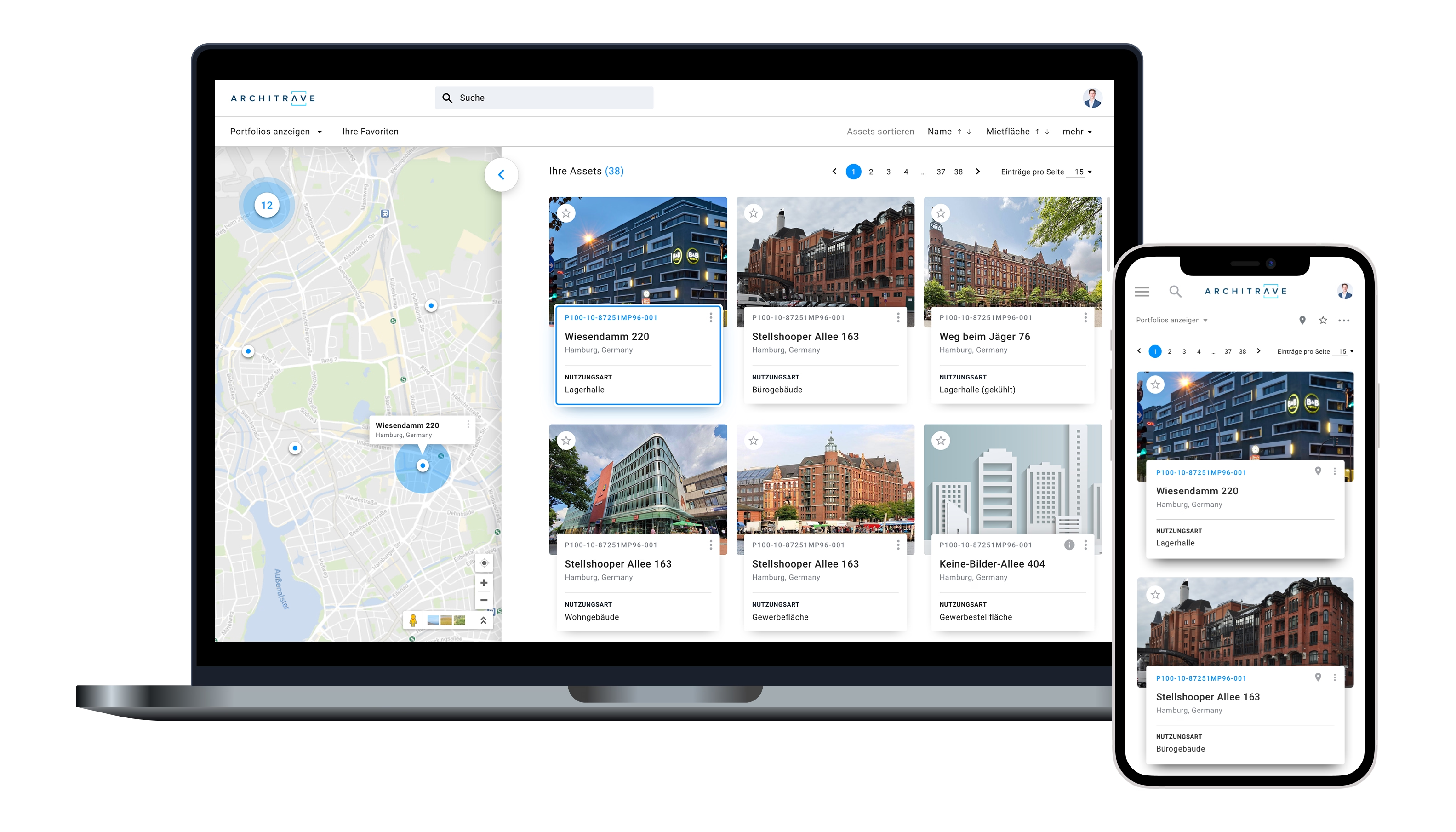
Explore my innovative interface featuring a dynamic map on the left for spatial context, while on the right, real estate asset cards elegantly populate. Utilize the intuitive search bar to swiftly locate specific assets, ensuring seamless navigation and enhanced user experience.

Asset Browser
Explore an interface that prioritizes functionality and elegance, featuring a dynamic file browser on the left sidebar. Effortlessly organize real estate assets, categorize properties, and collaborate in real-time with others.

Drag & Drop Documents
Drag and drop enhances user experience by providing an intuitive and direct way to interact with content, making tasks like organizing, moving, or uploading items feel more natural and efficient.

Smart Folders
Smart folders automate file organization, saving time and ensuring quick access to relevant documents, enhancing productivity and reducing errors.

Document search
Classes help users find their documents by categorizing them into organized, easily navigable groups, reducing the time spent searching through disorganized files. Saved searches with custom filters enhance productivity by allowing users to quickly access frequently used search criteria, streamlining repetitive tasks and ensuring consistent results with minimal effort.

Style Guide & Design System
I created a style guide and design system to establish consistent visual elements and interaction patterns across all interfaces, ensuring a cohesive and intuitive user experience. This helps by reducing cognitive load, allowing users to easily recognize and navigate elements, and enabling efficient collaboration among design and development teams.


